Fix rounds (optional add-on)
Turn on fix rounds Beta
What a project needs before Claude can fix pins: the switch and roles, a GitHub connection with write access, a required review on the base branch, and the Check setup box that tests it all.
This page is for the project's owner. Until every step is done, a submitted review still sorts the pins and leaves the fixable ones Agent ready for developers' own agents.
Check setup has run on a real repository; no round has run for real yet, so the first one is the test.
What runs where
| Where | What runs there |
|---|---|
| pinprompt's server | Holds the Anthropic key and the GitHub App's key. A job on the server picks up each submitted round, starts Claude's session, writes each group's commit from the files Claude hands back, and opens the pull request. It is the only part that writes to GitHub. |
| Anthropic (Managed Agents) | One Claude session per round, in a sandbox that can reach only package registries (npm and the like) besides the repository. It has a read-only checkout, edits and tests there, and hands changed files back with each group. The round's cap is the session's budget. The session is deleted when the round ends. |
| GitHub | The project's repository through the workspace's GitHub App: the round's own branch, one pull request per round, and the review rule that makes a person merge it. |
What you set up, and how often
| Once | Where | What |
|---|---|---|
| Per server | The host's environment (for example Railway variables) | ANTHROPIC_API_KEY, and ANTHROPIC_WORKSPACE_ID if it is an organization-level key (step 4). The GitHub App's credentials; if GitHub issues and repository links already work, they are set. |
| Per workspace | Nothing by hand | The first round creates the fixing agent and its sandbox in the key's Anthropic workspace and reuses them after. |
| Per repository | GitHub | The GitHub App installed on it with the permissions below, accepted on the installation (step 2), and a required review on the base branch (step 3). |
| Per project | Settings → Rules | The switch, the roles who may start rounds, the cap (step 1). Optional: CI files. Then Check setup. |
Check setup
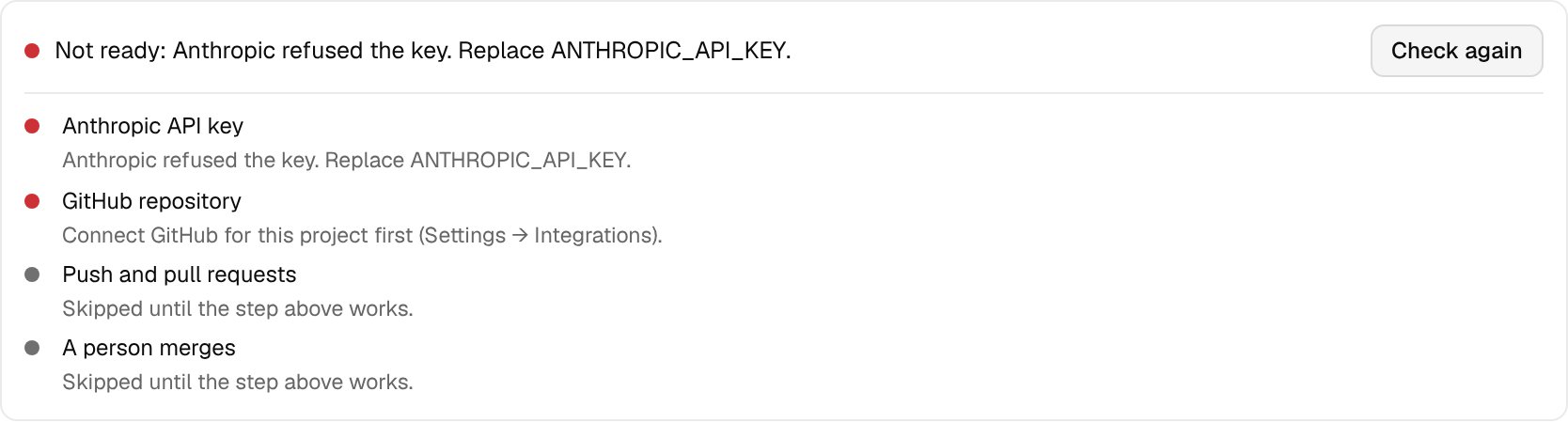
Settings → Rules has a Check setup box under the switch. It asks Anthropic and GitHub live, and says in one line whether rounds can run, then one row per step:
| Row | Passes when |
|---|---|
| Anthropic API key | The server's key is accepted and its workspace can use Managed Agents |
| GitHub repository | The project's GitHub connection opens the repository; shows the base branch |
| Push and pull requests | The project is connected through the GitHub App, and the app may write the round's branch and open a pull request. Red on a personal token |
| A person merges | The base branch needs an approving review before anything merges. Amber when the repository's plan can't require one and the owner has accepted that (below) |
The switch only turns on when no row fails, and a round checks the last row again before it starts. It runs by itself while the switch is on; Check again after you change something on GitHub.
1. The switch
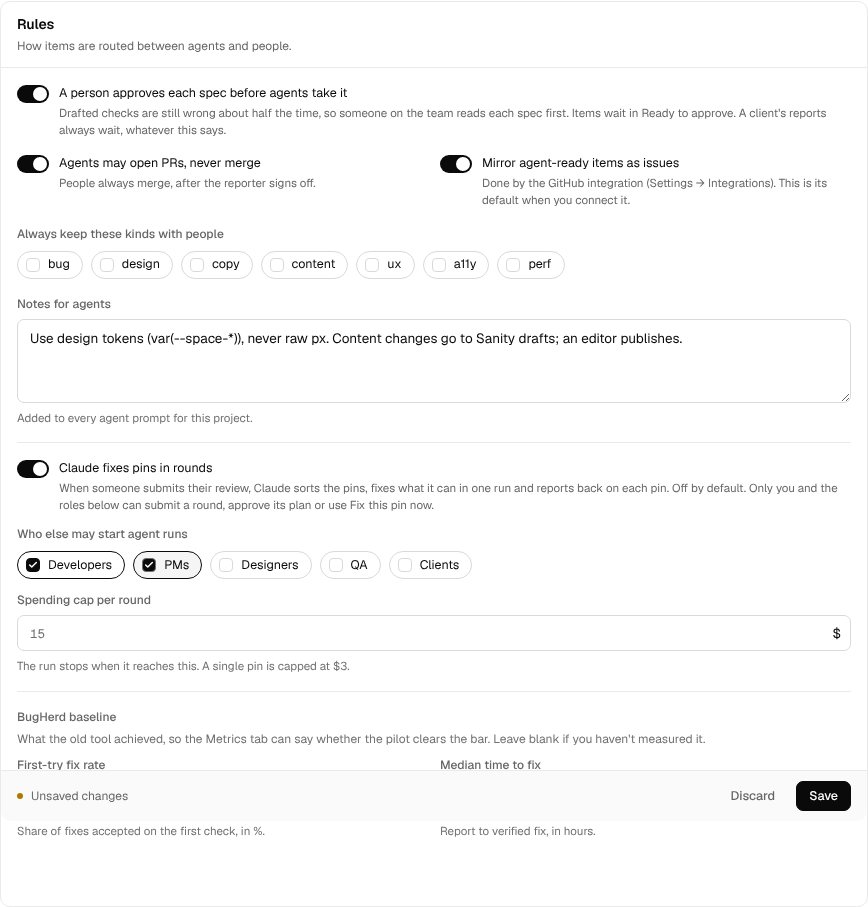
Settings → Rules → Claude fix rounds (a Beta line while they're off: press Show), then Claude fixes pins in rounds. Pick which roles may start rounds (developers, PMs, designers, QA) and the cap per round. Left blank, the cap is $15 per round and $3 for Fix this pin now.
2. GitHub, through the GitHub App
Fix rounds need the project connected through the workspace's GitHub App (Settings → Integrations → GitHub). A project connected with a personal token keeps everything else (issues, pull request links, CI), but Check setup shows Push and pull requests in red: a personal token can't be limited to reading, so Claude's checkout could push to any branch.
The app needs:
- Contents: read and write
- Pull requests: read and write
- Administration: read-only, so Check setup can read branch protection and the repository's plan (step 3)
Change the app's permissions on GitHub, then accept them on each installation (GitHub emails the installation's owner). These are two steps: until the installation accepts, the app keeps its old permissions. Check setup tells the two apart:
- "The GitHub App doesn't ask for Contents and Pull requests…": the app's own permissions aren't changed yet. The line links to the app's permissions page.
- "…the installation hasn't accepted yet": open the installation page the line links to (the organization's Settings → GitHub Apps → pinprompt → Configure), press Review request and accept.
- "pinprompt can't reach … through the GitHub App" on the GitHub repository line: the installation doesn't include the repository. On the same Configure page, add it under Repository access.
Check setup always asks GitHub for a new token, so an accepted change shows on the next Check again.
Claude's checkout is read-only. Claude never holds a token that can write. For each round, its checkout gets a token that can only read the project's repository. When a group is done, Claude hands its changed files to pinprompt, and pinprompt writes the commit itself on the round's own branch, named after the project, the round and its id (for example pinprompt/fb-r3-x7k2q9ab), so two projects on one repository never share a branch. pinprompt refuses to write any other branch and never force-pushes. If that branch is already on GitHub with commits pinprompt didn't write for the round, the round stops and asks you to delete the branch, rather than build on someone else's code. pinprompt's own token for this reaches only the project's repository, with only the two permissions above. Claude's session is deleted when the round ends, so neither the token nor the transcript stays at Anthropic.
CI files
By default Claude can't change anything under .github/ (workflows and actions). CI runs a branch of your own repository with the repository's secrets before anyone has reviewed the pull request, so a changed workflow could read them. The owner can turn on Let Claude change CI files under the fix rounds switch in Settings → Rules (owner only). Workflow files also need the GitHub App's Workflows permission, which pinprompt doesn't ask for.
Other files that CI runs are ordinary code, so Claude may change them like any fix: package.json scripts, test and build config, .gitmodules. A person reviews the pull request before it merges, but CI may already have run them. If your CI hands secrets to pull request builds, keep those jobs to pull_request from forks or require approval for them.
3. A person merges: require a review on the base branch
pinprompt refuses to run rounds until merging into the base branch needs an approving review, so a person always looks at Claude's pull request before it lands. On GitHub:
- 1.Open the repository → Settings → Rules → Rulesets → New branch ruleset.
- 2.Target your base branch (usually
main), tick Require a pull request before merging with at least 1 required approval. - 3.Set it Active and save, then Check again in pinprompt.
Classic branch protection with a required review works too, but pinprompt can only read it if the GitHub App has Administration: Read-only. Rulesets need no extra permission.
On a private repository without a ruleset, GitHub won't say whether the plan allows protection unless the app has Administration: Read-only. Check setup then says "pinprompt can't tell whether main needs a review, or whether this repository's plan allows one": give the app that permission, accept it on the installation, and Check again. GitHub Apps that pinprompt makes from now on ask for it from the start; an app made earlier needs it added by hand. On GitHub Free the line turns amber (below).
When the plan can't require a review
Some plans can't protect branches at all: on GitHub Free, private repositories have neither rulesets nor branch protection, and GitHub answers "Upgrade to GitHub Pro or make this repository public". Check setup then shows A person merges in amber instead of red, with a tick for the project's owner:
- pinprompt never merges, approves or turns on auto-merge, whatever its token could do; it opens the pull request and stops. A person merges.
- Claude can't push at all: its checkout is read-only, and pinprompt writes only the round's own branch (above).
- What the host can't do is stop a person with write access from merging without a review.
- The owner's tick is recorded with their name and the date, for this repository, branch and plan only. If any of them changes, or the repository later gets a review rule (then it turns green by itself), the tick no longer counts and Check setup asks again.
Until the owner ticks it, the switch stays off and rounds don't start. To get the strict check instead, move the repository to a plan that supports rulesets (GitHub Team, or Pro for personal accounts) or make it public.
4. The server's Anthropic key
Whoever runs pinprompt sets ANTHROPIC_API_KEY. A key made at the organization level (not inside a workspace) also needs ANTHROPIC_WORKSPACE_ID, the workspace's id (wrkspc_…, from console.anthropic.com → Settings → Workspaces); without it Anthropic refuses the key, and Check setup's first row says to set it. Rounds are billed to that key's Anthropic account (API usage, separate from any Claude subscription). The first round creates the fixing agent and its sandbox; nothing else to configure.
Cost
The cap is also set as a hard budget on Anthropic's side, so a run stops at it even if pinprompt is down. A run longer than 3 hours is stopped. Our estimate for a typical 40-pin round is $5–6; there is no real round yet to confirm it.
Full details, including how the sandbox reaches GitHub: Fix rounds reference.