Agents
Set up from Claude Beta
Connect pinprompt to claude.ai or Claude Code with "All my projects", then create projects, set sites, the review script, Sanity Studio previews, repo and rules, and invite people by asking Claude.
Owners, developers and anyone else who sets up projects can do it by asking Claude: "create a project for Acme with staging at staging.acme.com and repo acme/shop, turn on feedback without the extension, add our Sanity Studio and invite jo@acme.com as a client". Claude uses pinprompt's MCP server, signed in as you.
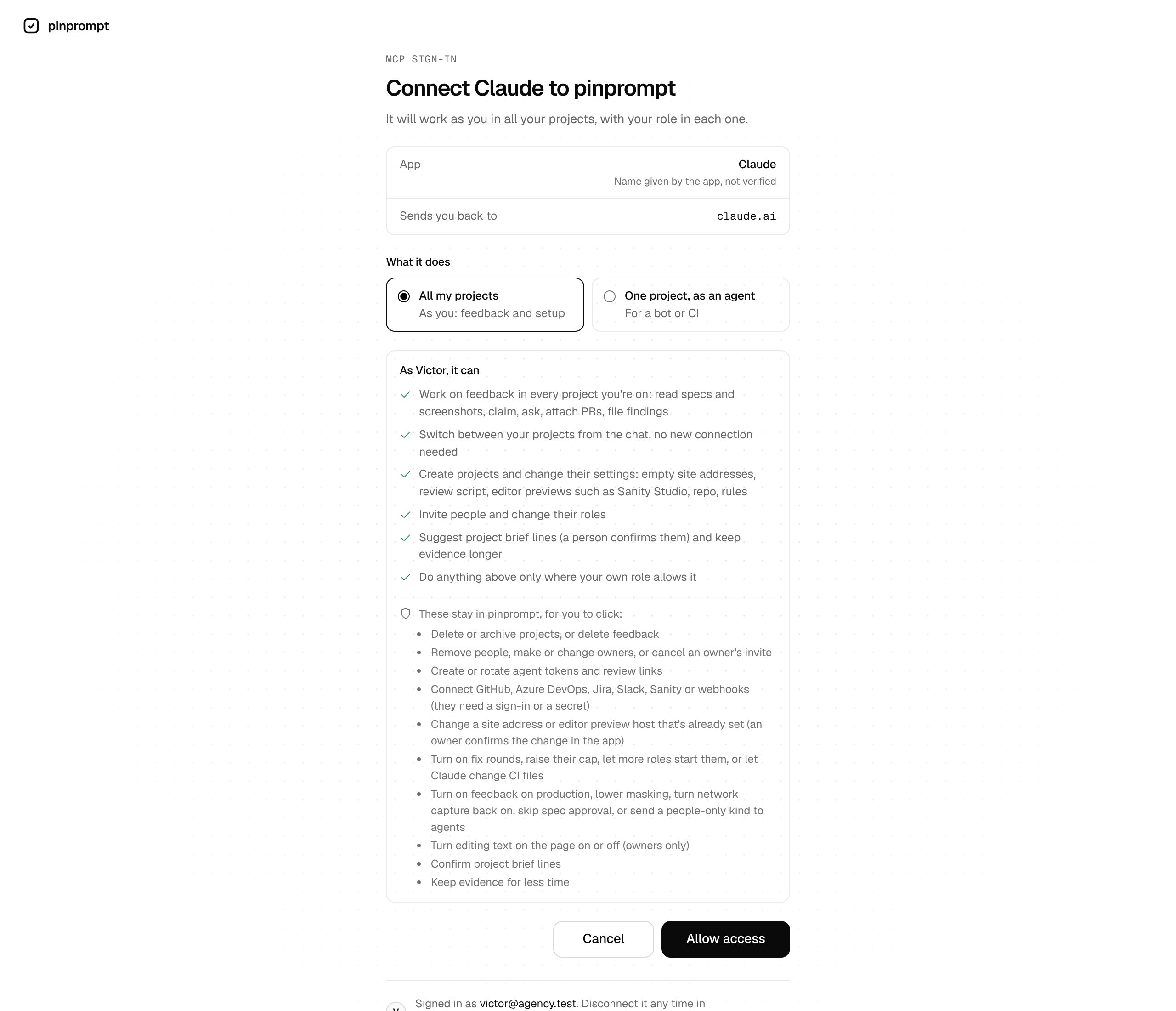
Connect
The MCP server lives at https://<your pinprompt>/api/mcp. There's no token to paste: you sign in in the browser.
claude.ai (and the Claude desktop and mobile apps)
- 1.Settings → Connectors → Add custom connector.
- 2.Name it pinprompt, URL
https://<your pinprompt>/api/mcp. Leave client ID and secret empty. - 3.Click Connect. pinprompt's sign-in page opens (sign in by email first if you need to).
- 4.Keep All my projects picked, check what it lists, then Allow access.
claude.ai needs pinprompt on a public HTTPS address, so this works with a hosted pinprompt, not localhost.
Claude Code
claude mcp add --transport http pinprompt https://<your pinprompt>/api/mcpThen run /mcp, pick pinprompt, choose Authenticate, and keep All my projects picked in the browser. With the Claude Code plugin installed, /pinprompt:setup walks Claude through a new project.
The same connection reaches every project you're on and brings the feedback tools too (list, claim, attach a PR), acting as you: One connection for all your projects. use_project picks the project the setup tools work on, so you don't name it on every request, and a project you create becomes the current one. For a coding agent with a name of its own in the activity, pick One project, as an agent instead.
What Claude can do
It acts as you, with your role in each project, so it can do what the settings pages let you do, and nothing more.
| Ask for | Tool |
|---|---|
| Your projects and what's missing on each | list_projects, get_project_settings |
| Work on one project without naming it each time | use_project |
| A new project (you become its owner) | create_project |
| Staging, preview and production addresses when they're empty; network capture off | update_project |
| Feedback without the extension (the review script) | update_project review_script |
| Your Sanity Studio's address for feedback in Presentation | update_project preview_hosts |
| Stricter masking: Strict mode, more pages or selectors | update_project masking |
| Repo, base branch, framework, Figma, CMS | update_project |
| Rules: agents may open PRs, more people-only kinds, agent notes, spec approval on | update_project |
| Invite people, change roles, cancel invites | invite_people, change_role, cancel_invite |
| Lines for the project brief, as suggestions a person confirms | edit_brief |
| Workspace evidence retention, longer | set_evidence_retention |
| Whether a project is ready for fix rounds | check_fix_setup |
Invite links never appear in the chat: each person gets their invite by email, and Settings → Team can copy a link.
Brief lines Claude adds or edits are marked by Claude and stay unconfirmed, so no draft or fix uses them until someone confirms them on the Brief page.
Changing a site address that's set
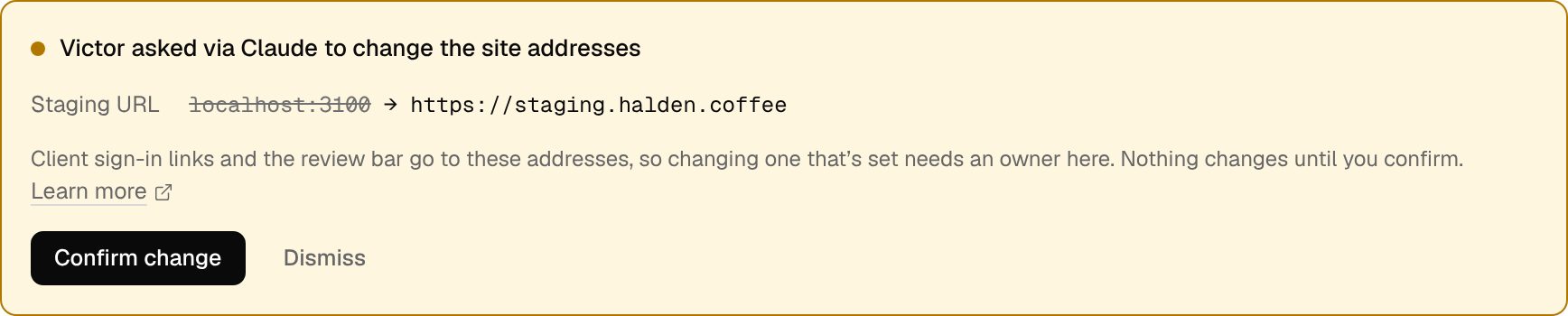
Claude can fill in a staging, preview or production address, or the editor preview hosts, while they're empty. Changing or removing one that's already set waits for a project owner: Claude says Not changed yet and gives you a link to Settings → General, where the change shows with the old and new value and Confirm change or Dismiss. Client sign-in links and the review bar go to these addresses, so a prompt hidden in a page or file can't quietly move them. Asked changes expire after a week, and one is refused if the addresses changed since it was asked.
What stays in the app
Anything that deletes, lowers protection, costs money or needs a secret stays a click in pinprompt. When you ask Claude for one of these, pinprompt refuses it and Claude gives you the link to the settings page that does it:
- deleting or archiving a project, deleting feedback;
- removing people, making someone an owner, changing an owner's role, cancelling an owner's invite;
- agent tokens and review links;
- connecting GitHub, GitLab, Bitbucket, Azure DevOps, Jira, Linear, Asana, ClickUp, Trello, Slack, Sanity or webhooks (they need a sign-in or a secret);
- turning fix rounds on, raising their cap (an unset cap counts as $15), letting more roles start them, letting Claude change CI files;
- feedback on the production site, lowering masking, turning network capture back on, letting agents take specs without a person's approval, taking a kind off people only;
- confirming brief lines;
- keeping evidence for less time.
The server enforces this, whatever Claude is asked.
See and stop it
- Every change it makes shows in the project's Activity as yours, "via Claude". pinprompt names the app from where its sign-in returns, not from the name it gives itself: claude.ai is "Claude", an app on your computer (Claude Code) is "an app on a computer", anything else shows its web address.
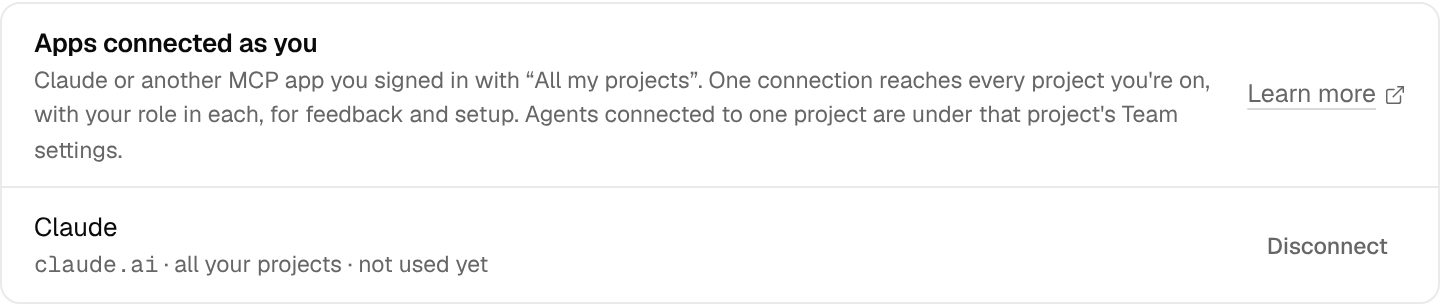
- Account → Apps connected as you lists each connection, the project it's working in, when it was last used, and Disconnect, which ends it at once.
- The connection ends by itself if you leave the workspace or are no longer on any project's team.
Beta: built and tested end to end and in automated tests, with little real use so far. Working on items over this same connection came in 0.4.5 (One connection for all your projects); see What works today.