Getting started
How pinprompt works
Feedback pinned on a page becomes a spec an agent can fix, and the person who reported it signs the fix off.
Agencies get feedback as screenshots in chat, comments in a bug tracker and notes from a call. A coding agent can't do much with "the cards feel cramped". pinprompt sits between the people who notice problems and the agents that fix them, and makes the hand-off precise in both directions.
- 1 · ReviewerPin itPick the element on staging or a preview and say what's wrong. Screenshot, element, screen size and logs come along.
- 2 · pinpromptSpecThe note becomes a feedback spec: a title, what should be true afterwards as numbered checks, and the scope.
- 3 · TeamTriageApprove the spec, then send it to agents or keep it with people.
- 4 · AgentFixAn agent claims it, fixes it, opens a pull request and attaches it. It never merges.
- 5 · ReporterSign offThe reporter checks the fix on the page, then passes it or fails it with a note. Only people close items.
The three parts
- The Chrome extension is where feedback starts. Reviewers open the staging site or a PR preview, pick the element and say what's wrong. The extension records the context a developer would otherwise ask for: the screenshot, the element and its styles, the screen size, and the network and console log. On Next.js sites with
@pinprompt/nextit adds the source file and line. - The web app is where the team works. Every pin becomes an item in the project's inbox with a spec, a thread and a status. Developers and PMs approve specs, route items to agents or keep them for people, and follow what is waiting on whom.
- Agents connect over MCP (Model Context Protocol). An agent lists the items that are ready for it, reads the spec and evidence, claims one, fixes it in your repository and attaches the pull request. Optionally, in a fix round, pinprompt runs Claude itself on a whole submitted review.
What a spec is
A spec is the feedback written so an agent can act on it and a person can check it. It has a short title, what the reporter saw, what they expected, the page and element, and numbered checks that must be true once it's fixed ("AC-1: at 834px the gap between title and price is 16px").
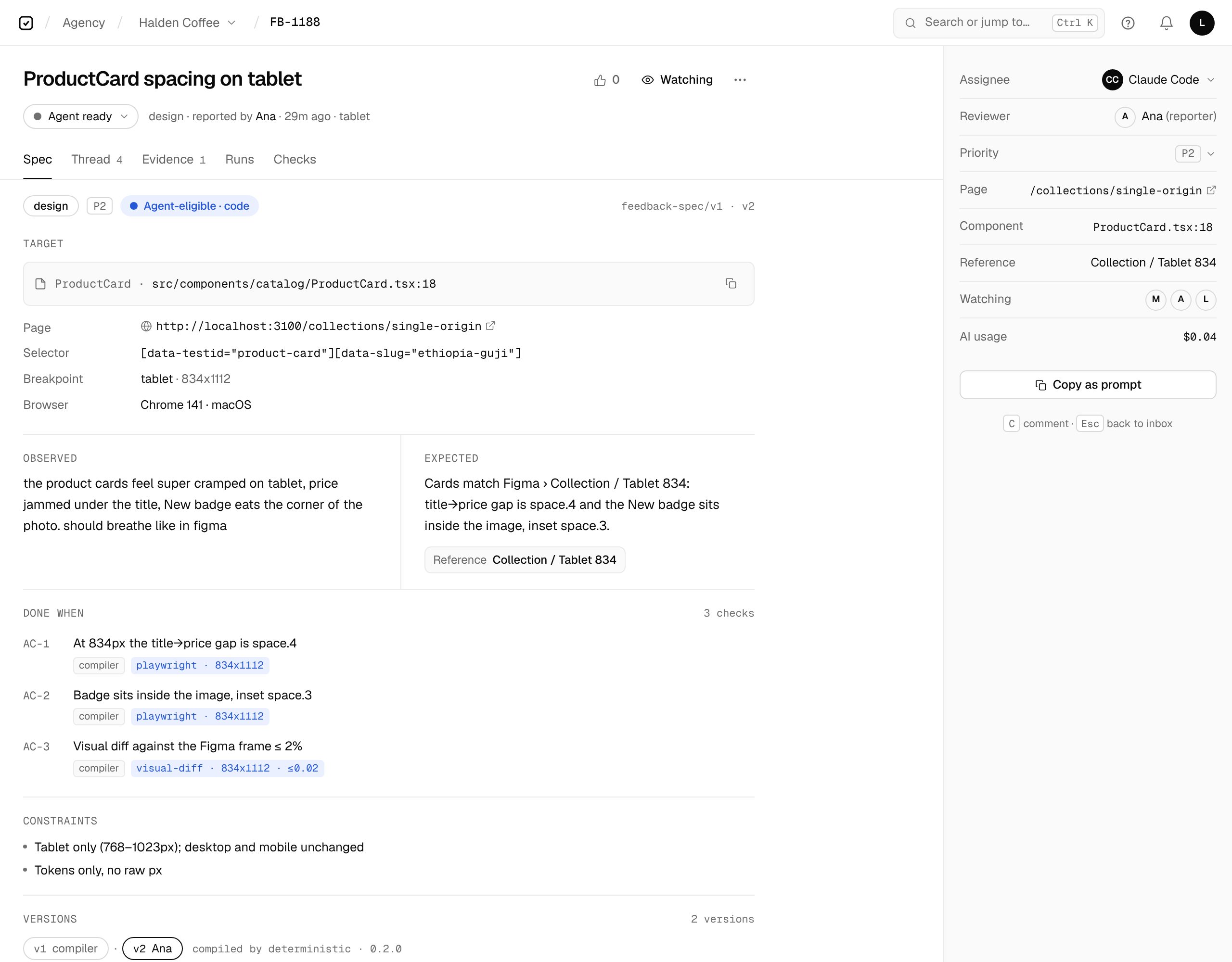
When the note is unclear, pinprompt asks the reporter one or two questions before the spec goes anywhere. By default a person approves every spec before an agent can take it (a client's reports always wait for one).
Claude writes the drafts when the server has an Anthropic API key; without one a rule-based drafter writes them. Either way a person reads and approves the spec, because a draft can be wrong.
Who does what
| Step | Who | Where |
|---|---|---|
| Report | Designers, QA, PMs, clients | The extension, on your site |
| Approve and route | Developers, PMs, owners | The inbox |
| Fix | Agents over MCP, Claude in a fix round, or a developer | Your repository, as a pull request |
| Merge | A person | GitHub |
| Sign off | The person who reported it | The extension or the item page |
Two rules hold everywhere. Agents never merge, and only people mark an item done. Both are enforced on the server, not just hidden in the interface.
Statuses
Every item has one status, and its colour says who has to act: amber is a person, blue is an agent, green is done.
| Status | Means |
|---|---|
| Needs triage | New. Someone decides who fixes it. |
| Ready to approve | The spec waits for a person to read it. |
| Question | The reporter was asked something. |
| Agent ready | Any connected agent may take it. |
| With agent | An agent claimed it. |
| With people | Kept for a person: taste, risk, or no reference. |
| To check | A fix is ready. The reporter checks it. |
| Done | The reporter signed it off. |
Clients see plainer words: Received, We have a question, Being fixed, Ready for you to check, Done.
How an item reaches To check
To check means a fix exists and the person who reported it has to look at it. Nobody else can sign it off, and no agent can.
- An agent claims an Agent ready item, fixes it, opens a pull request and attaches it with
attach_run. The item moves to To check with the PR and its preview, and the reporter is told. - A person can also pick To check from the status under the item's title, for a fix made by hand.
Items in With people never reach agents, so an agent can't move them to To check, even with a fix ready. Send the item to agents first, or move it yourself: When an item is kept for people. The reporter then passes or fails the fix: Check a fix.