For teams
Plans and billing Beta
What a pinprompt plan counts (team seats, active projects, AI drafting, evidence), what it never counts (clients, agents), what happens at a limit, and paying in the app with Stripe.
A plan sets four numbers for a workspace. Every plan has the same features; only the numbers change. Clients and agents are never counted, so inviting a client or connecting another agent never costs anything.
Limits only apply on a server that has plans switched on. Every workspace that existed before plans is on Internal, which has no limits. A workspace owner pays for Studio or Agency in the app, with Stripe, when the server has billing set up; otherwise whoever runs the server sets the plan.
The plans
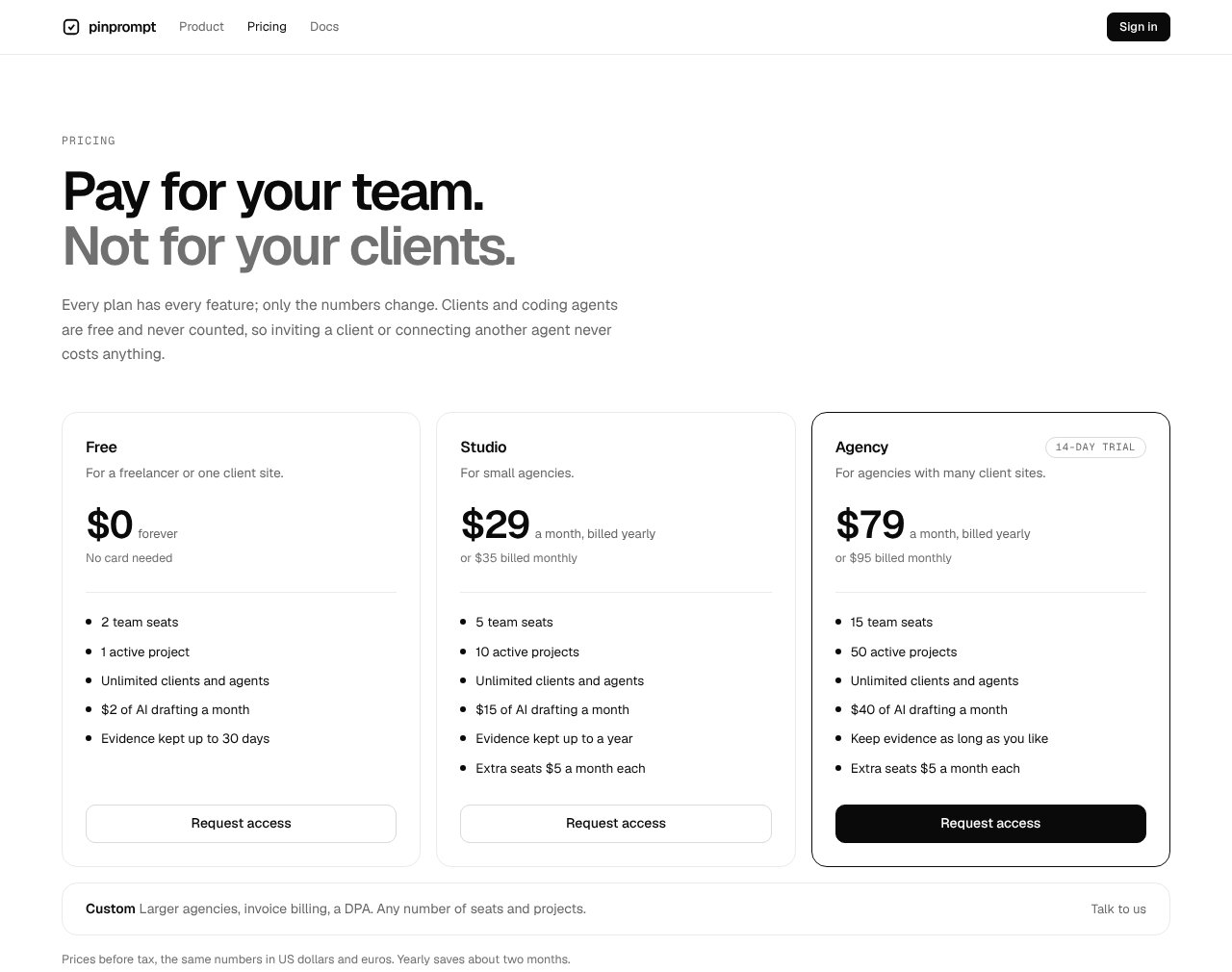
| Free | Studio | Agency | Custom | |
|---|---|---|---|---|
| Price a month, billed yearly | $0 | $29 | $79 | talk to us |
| Price a month, billed monthly | $0 | $35 | $95 | |
| Team seats | 2 | 5 | 15 | any |
| Extra seats | $5 each | $5 each | ||
| Active projects (not archived; the sample project never counts) | 1 | 10 | 50 | any |
| Clients and agents | unlimited | unlimited | unlimited | unlimited |
| AI drafting included a month | $2 | $15 | $40 | any |
| Longest evidence retention | 30 days | 1 year | any | any |
Prices are before tax, and the same numbers in US dollars and euros. Someone in Europe sees them in euros (from their browser's time zone or language), everyone else in dollars; AI drafting is always counted in dollars. The public pricing page shows the same table on a server with plans on.
A workspace created by signing up starts with a 14-day trial of Agency; when a trial ends without a plan, the workspace counts as Free and nothing is deleted.
What counts
- Team seats: the workspace's owners and anyone with a role other than client on any project: developers, PMs, designers, QA. Someone who is a client on one project and a developer on another takes a seat. A pending invite for a team role holds a seat until it's accepted, revoked or expires.
- Active projects: projects that aren't archived. Archiving a finished project frees its slot and keeps everything in it readable. Restoring it needs a free slot again.
- AI drafting: what Claude drafting costs this month (drafts, structuring a Just comment note, the project brief, Learned from feedback). Past the plan's amount, feedback is drafted by the free rule-based drafter until the 1st, exactly like the Claude spending cap. An owner's own cap still applies when it is lower. There are no surprise bills.
- Evidence: screenshots, recordings and logs are removed at most this many days after an item closes, even when the workspace's setting says to keep them longer. After a move to a smaller plan, or when a trial ends, nothing is removed for the plan's sake for 30 days; the retention card shows the date it starts.
Not counted: clients, agents and their tokens, pins, items, comments, integrations.
At a limit
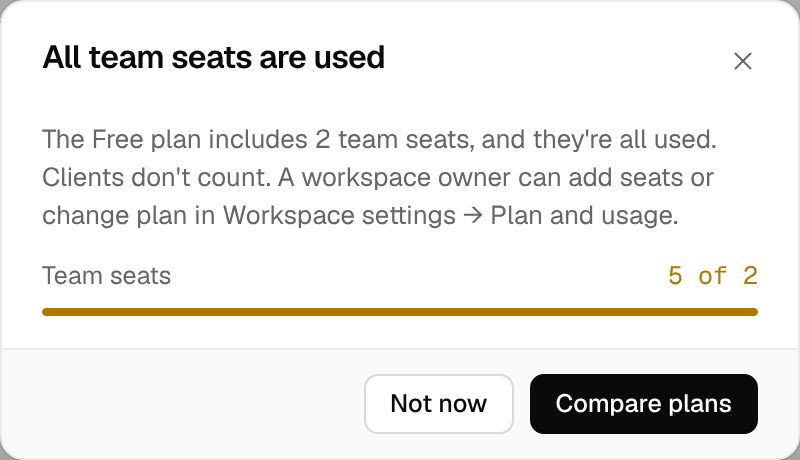
Nothing stops working. A workspace that is over a limit (after a downgrade or a trial) keeps everything it has, can still invite clients and move people between roles, and can make a team member a client to free a seat. Inviting another team member, creating or restoring a project, or choosing a longer retention is refused with a message that says which limit, and how to make room: archive a project, remove someone from the team, or change plan. In the app that message opens as a small window with the limit's meter; workspace owners get Compare plans there, everyone else is told an owner can change it. New project says it before you start when every active project slot is used, and shows the message on the page (with Compare plans) instead of the window. Agents connected over MCP get the same message, so they can tell the person they work for. Clients can still be invited.
Where to see it
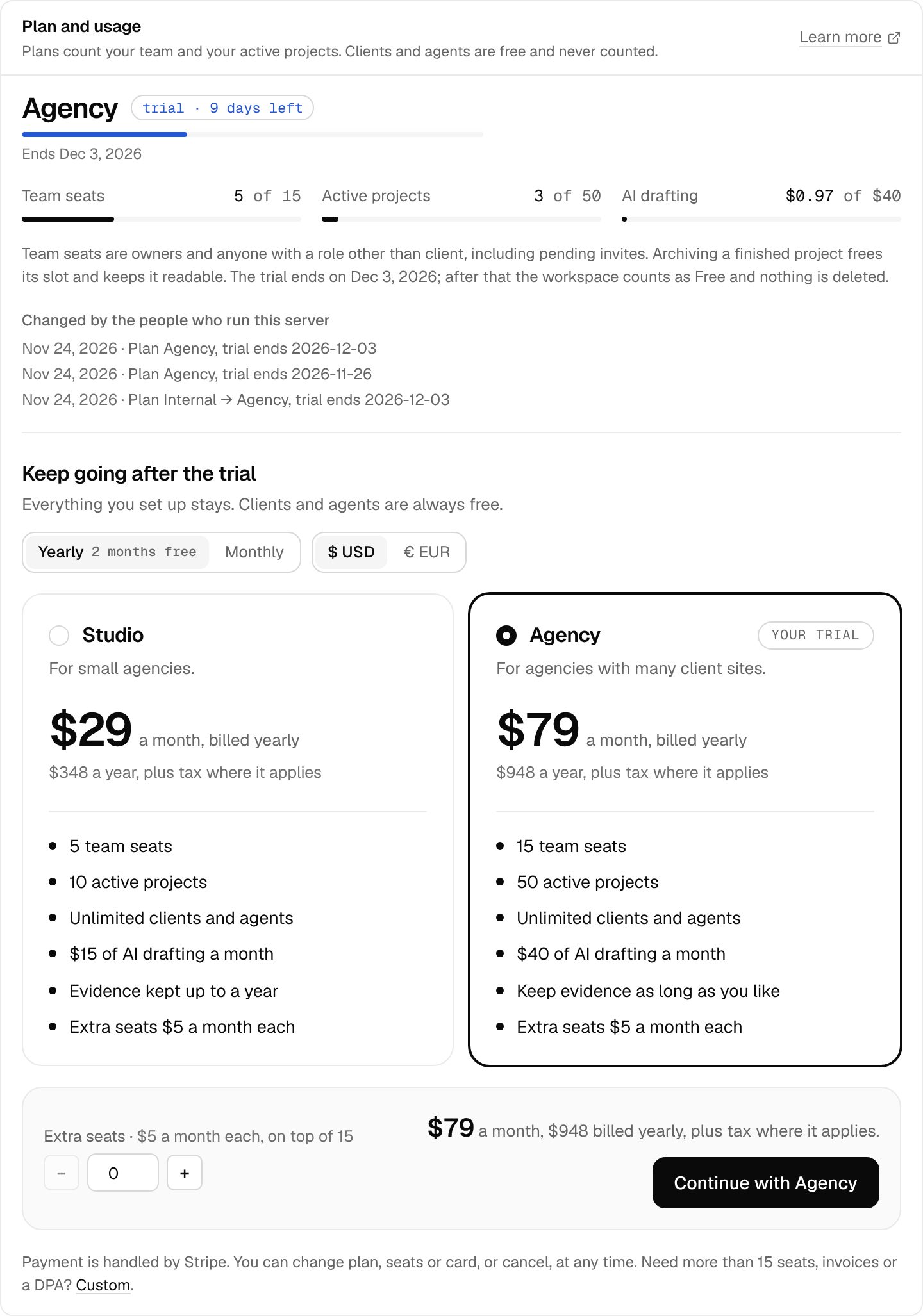
Workspace settings → Plan and usage shows the plan, the team seats and active projects in use, and AI drafting this month. Everyone on the team can see it; clients can't. Owners also reach it from Plan and usage in the account menu and Upgrade plan in Ctrl K.
Upgrade
Workspace owners see the plan where they work, so nobody has to go looking for it:
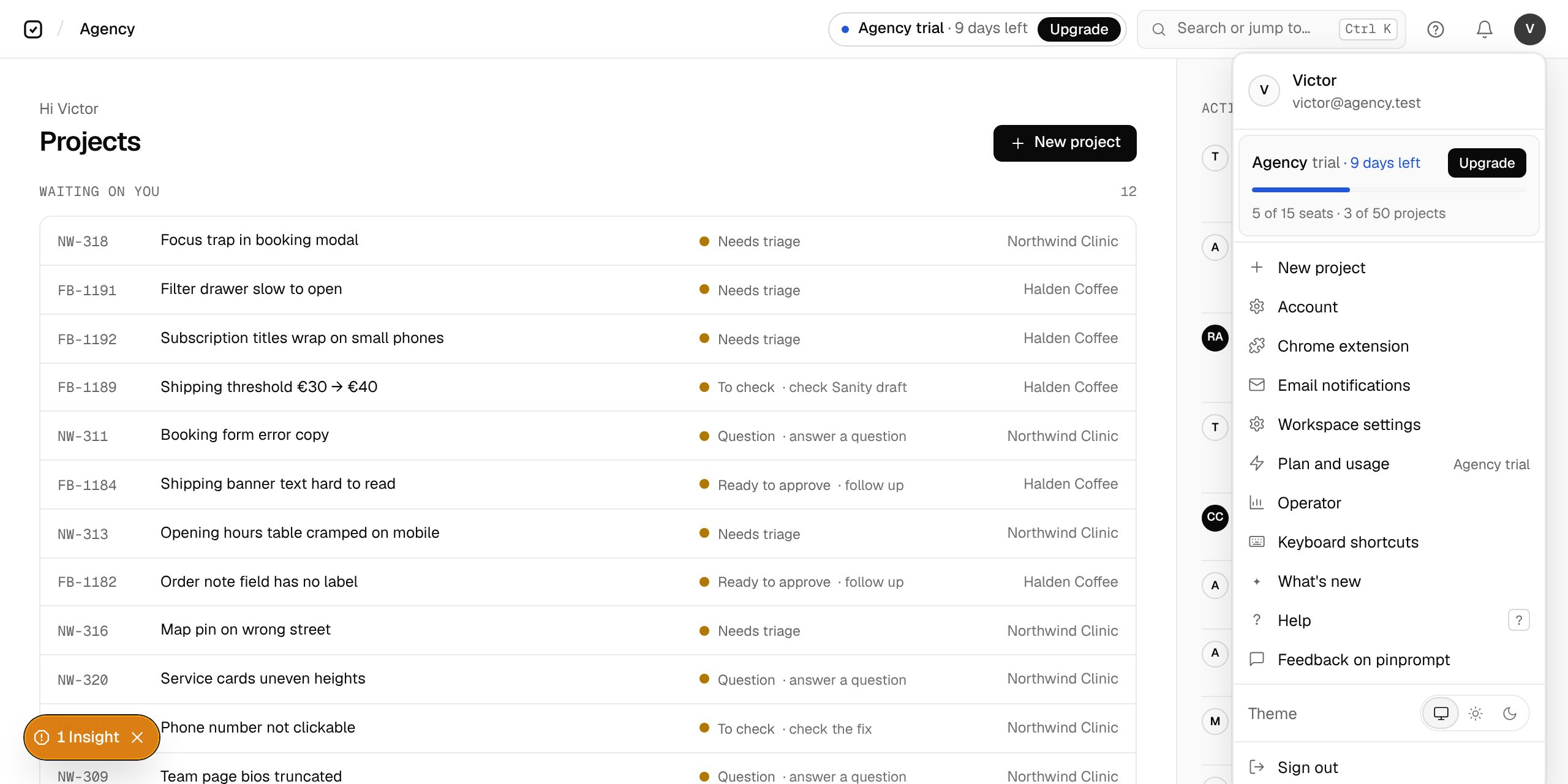
- In the header, during a trial: Agency trial · 9 days left with Upgrade. It turns amber in the last 3 days. On Free it's just Upgrade. If a payment fails, it says Payment failed until the card is fixed. A workspace that pays shows nothing there.
- In the account menu, a small card with the plan, the days left, the seats and projects in use, and Upgrade, plus a Plan and usage entry.
- When a trial ends, a strip under the header says so once: the workspace is on Free now and nothing was deleted, with See plans. Not now hides it in that browser.

Every one of them leads to Plan and usage. Clients, the rest of the team, agents, workspaces on Internal or Custom, and servers without plans never see any of it.
Paying
Paying in the app is Experimental: it has been tested against a stand-in Stripe, not yet with real payments.
A workspace owner pays in Workspace settings → Plan and usage:
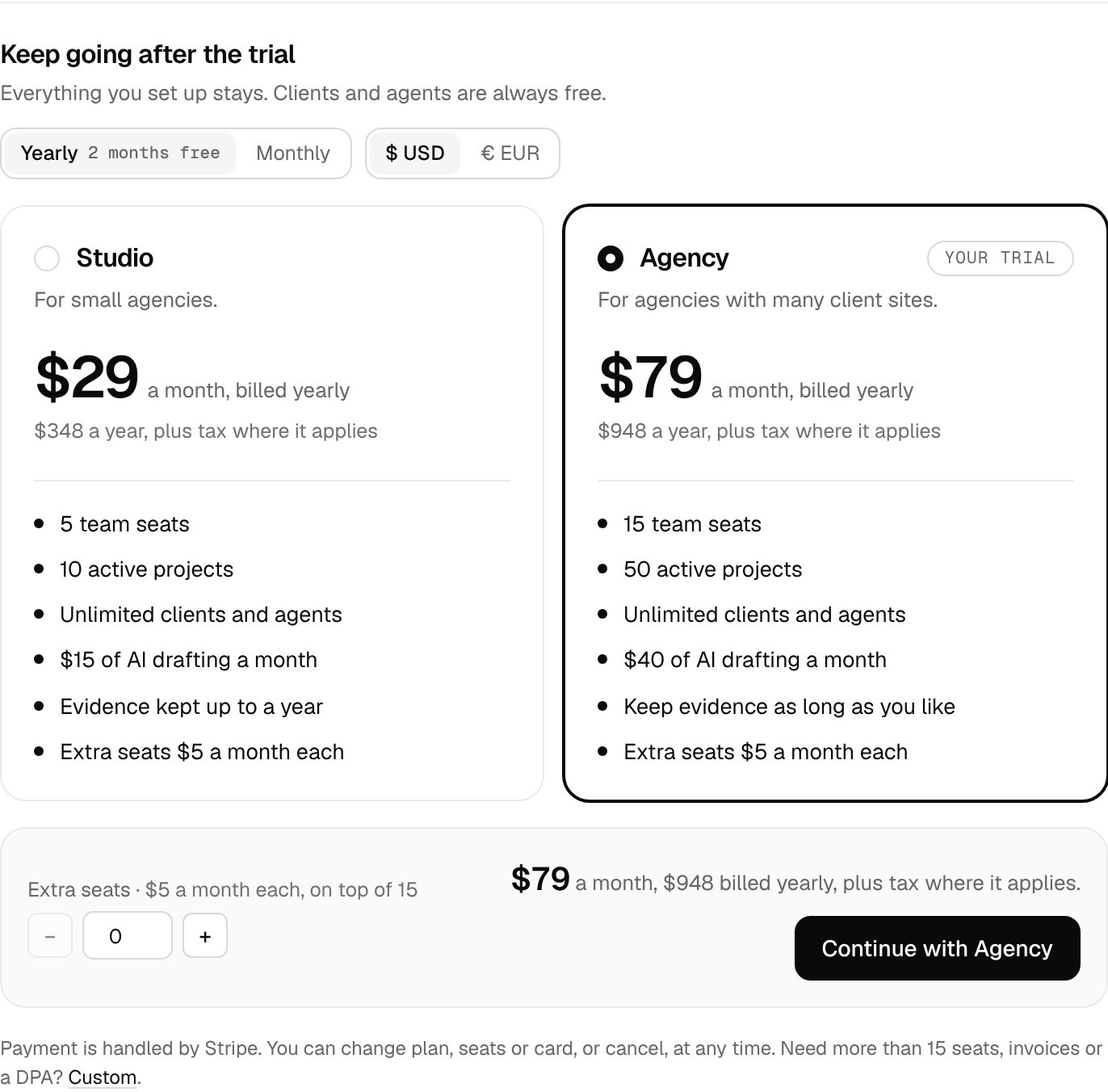
- 1.Pick Studio or Agency (each card lists its seats, projects, AI drafting and evidence), Yearly (about two months free) or Monthly, $ USD or € EUR (euros are picked for you in Europe, your own pick is remembered in this browser, and a workspace that paid before keeps its currency), and any extra seats with − and +. The total a month, and a year when billed yearly, is shown next to the button.
- 2.Continue with Studio (or Agency) opens Stripe's checkout page. Enter the card, the billing address and, for a business, its VAT or tax id.
- 3.Back in pinprompt, the plan changes as soon as Stripe confirms the payment, usually within seconds. A trial ends there: the paid plan applies from now.
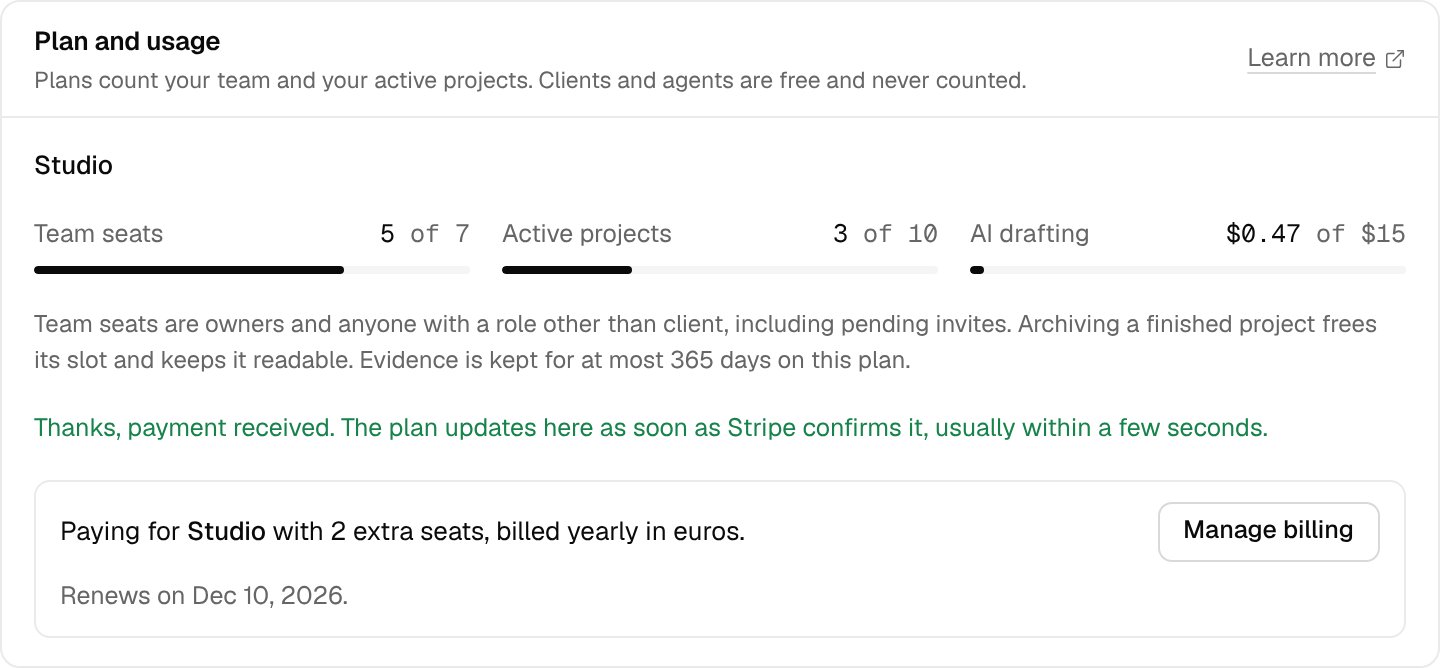
Once a workspace pays, Manage billing opens Stripe's billing portal: change the card, download invoices, or cancel. Only owners see the buttons; everyone else on the team sees the plan.
Changing plan
Upgrade or change plan (next to Manage billing) changes the plan right there, without going back through checkout:
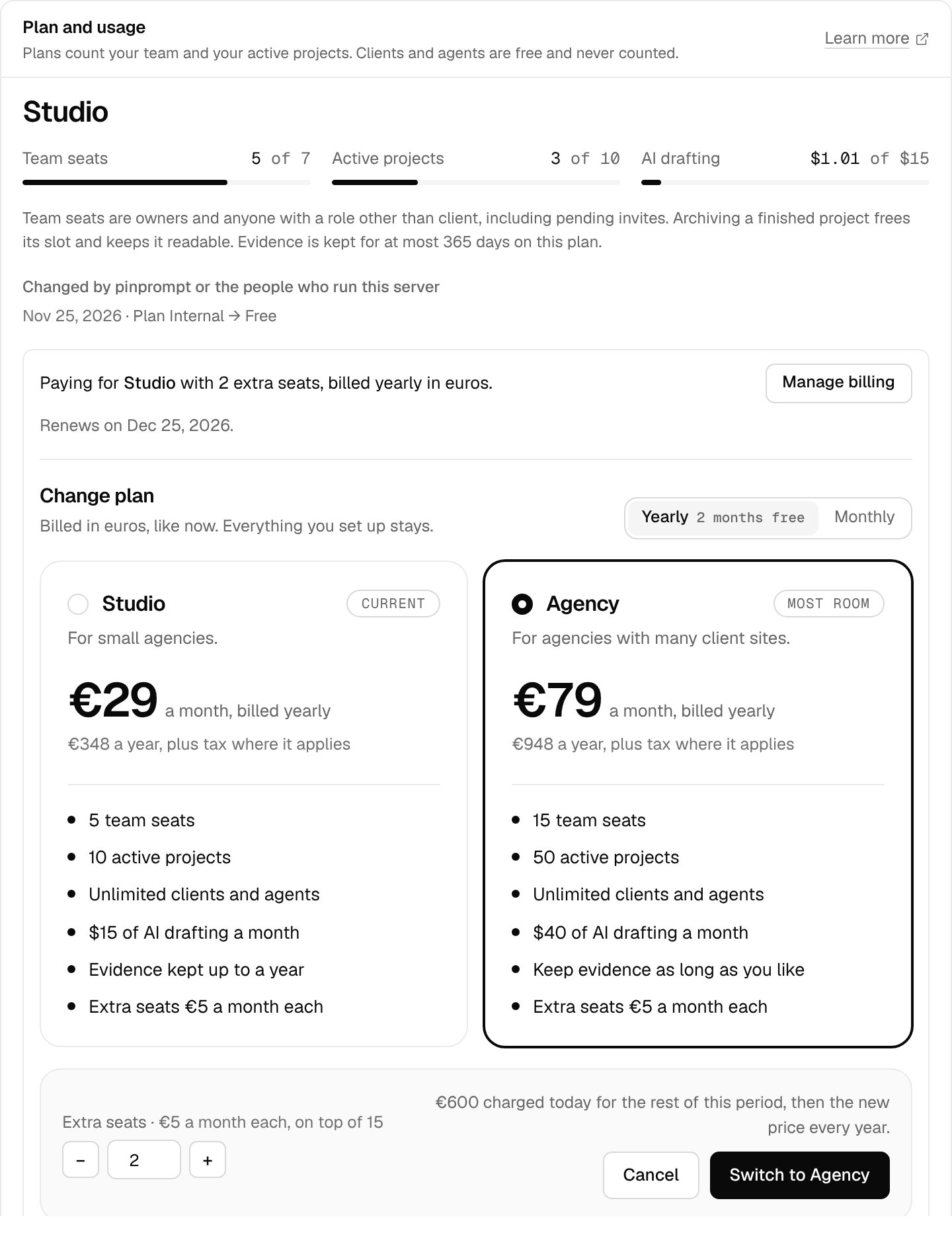
- 1.Pick the plan, Yearly or Monthly, and the extra seats. The currency stays the one the workspace pays in.
- 2.Under the plans it says what happens before you confirm, worked out by Stripe:
- Moving up (a bigger plan, more seats, or monthly to yearly, or back): the difference for the rest of the current period is charged to the card on file today, then the new price from the next renewal.
- Moving down (a smaller plan or fewer seats): nothing is charged today. The time not used on the old plan is credited, and the next invoice says how much it is and when.
- 1.Switch to Agency (or Switch to yearly, Update seats) makes the change. The workspace's limits follow at once.
If the card is declined, nothing changes: update it in Manage billing and try again. A smaller plan is refused while the workspace uses more team seats or active projects than it allows (the message says which). A workspace whose last payment failed, or whose subscription is set to cancel, changes plan in Manage billing instead, once that's sorted. The change is written to the event log like any other subscription update, under the owner who made it.
- Tax. Prices are before tax. Stripe Tax adds VAT or sales tax where it applies, from the billing address, and a valid EU VAT id reverse-charges it. Invoices come from Stripe by email.
- A payment that fails. Stripe retries the card over a couple of weeks and emails the card owner each time. Meanwhile the workspace keeps its plan and Plan and usage says the last payment didn't go through. If it's still unpaid after the last retry, the workspace moves to Free. Nothing is deleted.
- Cancelling. The workspace keeps the plan until the end of the period it paid for, then counts as Free. Plan and usage shows the date.
- The trial. Owners get one email 3 days before a trial ends. A trial that's about to end before any coding agent has picked up one of the workspace's own pins (the sample project doesn't count) gets 7 more days, once, so the team sees what they'd pay for first. It's listed under Plan and usage as Trial extended to …, and the reminder comes again 3 days before the new end. No card is needed for the trial, and nothing is charged when it ends.
Agents over MCP can't see or change billing.
For whoever runs the server
Plans are off unless the server runs with PINPROMPT_PLANS=on. With it off, no workspace is limited, whatever its plan, and /pricing is not there (it answers 404 and isn't in the sitemap or the landing page). With it on, /pricing is public and its buttons follow PINPROMPT_SIGNUP: Request access, Start 14-day trial (open sign-up, with one line under the plans saying the trial needs no card and ends on Free), or none on an invite-only server.
The operator console is the easiest way to change a workspace: its plan, a plan given free of charge, the trial, one limit set by hand, the Claude cap, or suspending it. Each change asks for a reason and goes in the audit log. The workspace's owners see what changed (not the reason) under Plan and usage, in a list headed Changed by pinprompt or the people who run this server (with a trial pinprompt extended itself). The plan script does the same from a terminal:
pnpm --filter @pinprompt/core plan:set                                    # list workspaces and their plans
pnpm --filter @pinprompt/core plan:set <workspace-slug> studio --extra-seats 2
pnpm --filter @pinprompt/core plan:set <workspace-slug> agency --trial-days 14
pnpm --filter @pinprompt/core plan:set <workspace-slug> internal          # no limits again
Each change is written to the workspace's event log as workspace.plan_changed. A workspace that pays through Stripe gets its plan from Stripe: the console won't change its plan, seats or trial, and a change made with plan:set lasts until Stripe's next update for it. A plan given free of charge in the console stays when a Stripe subscription ends; paying for a plan ends it.
Setting up billing
Paying in the app needs plans on and two settings from your Stripe account (deploy checklist):
- 1.In Stripe, turn on Stripe Tax and add your tax registrations, and set up the customer portal (Settings → Billing → Customer portal): allow switching between the Studio and Agency products, changing quantities, updating the card and cancelling at the end of the period.
- 2.Create the products and prices once, with your secret key in
STRIPE_SECRET_KEY:
   pnpm --filter @pinprompt/core billing:setup          # test mode key (sk_test_…)
   pnpm --filter @pinprompt/core billing:setup --live   # needed for a live key
It makes Studio, Agency and Extra seat, each with a monthly and a yearly price in USD and EUR, found later by their lookup keys (pinprompt_studio_yearly_eur and so on). Running it again changes nothing.
- 1.Add a webhook endpoint at
https://<your server>/api/hooks/stripeforcheckout.session.completedandcustomer.subscription.created,.updated,.deleted,.pausedand.resumed, and put its signing secret inSTRIPE_WEBHOOK_SECRET.
A workspace follows one subscription at a time. Starting a new checkout expires an earlier one that wasn't paid, so it can't be paid as well. If a second subscription for the same workspace is made some other way (in Stripe's dashboard, say), pinprompt ignores it while the first is running and raises a Billing alert in Server health (an email to the server's operators); cancel and refund it in Stripe. The same alert comes when a workspace pays for a price pinprompt doesn't know (one made by hand in Stripe): its plan stays as it was. Webhooks refused for a bad signature three times in a row raise a Stripe webhooks alert: usually a wrong STRIPE_WEBHOOK_SECRET. Coming back from Checkout, the page also reads the payment from Stripe itself, so a late webhook doesn't leave a paying workspace on its old plan, and a second checkout can't be opened over one that was just paid. A subscription Stripe pauses (a trial that ended without a card) counts as ended. Workspaces on Internal or Custom can't pay in the app, and Stripe never changes their plan. If the server can't reach Stripe while handling a webhook it answers with an error, so Stripe sends it again later.
The server's operators see every subscription, failed payments, cancellations and MRR month by month under Operator → Billing.
Every subscription change is written to the workspace's event log as workspace.subscription_updated (plan, status, interval, currency, seats and monthly revenue), followed by workspace.plan_changed when the plan moves.
FAQ
Do clients cost anything? No. Invite as many as you like on every plan.
Does connecting more agents cost anything? No. Agents read feedback over MCP for free on every plan.
What happens to projects over the limit after a downgrade? Nothing is removed. You can't add more until you archive some.
Can we pay by invoice? Yes, on Custom. Write to whoever runs your pinprompt server.
Are prices with or without VAT? Without. Stripe adds it at checkout where it applies.