Your sites and hosting
Sensitive data Beta
How pinprompt keeps customer names, emails, addresses, card numbers and form values out of screenshots, recordings and page text, and how to mark private parts of your site in its code.
Reviewers pin feedback on real pages: admin screens with customer orders, account pages, checkouts. pinprompt masks private data in the reviewer's browser, before anything is captured (in the extension from 0.2.0, the review link and Sanity Presentation; the server's checks run on every capture). The masked parts never leave the browser, so they are not on the pinprompt server, in the spec, in a GitHub issue or in front of an agent.
| On screen, for the reviewer | What pinprompt receives |
|---|---|
| !An order table with customer names, emails, phone numbers, addresses and card numbers | !The same table with grey bars over every private value |
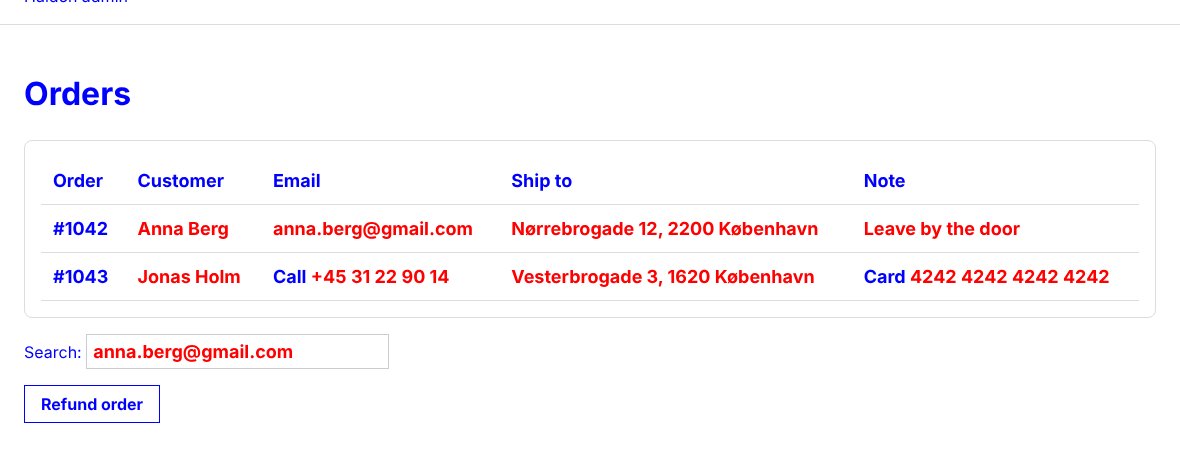
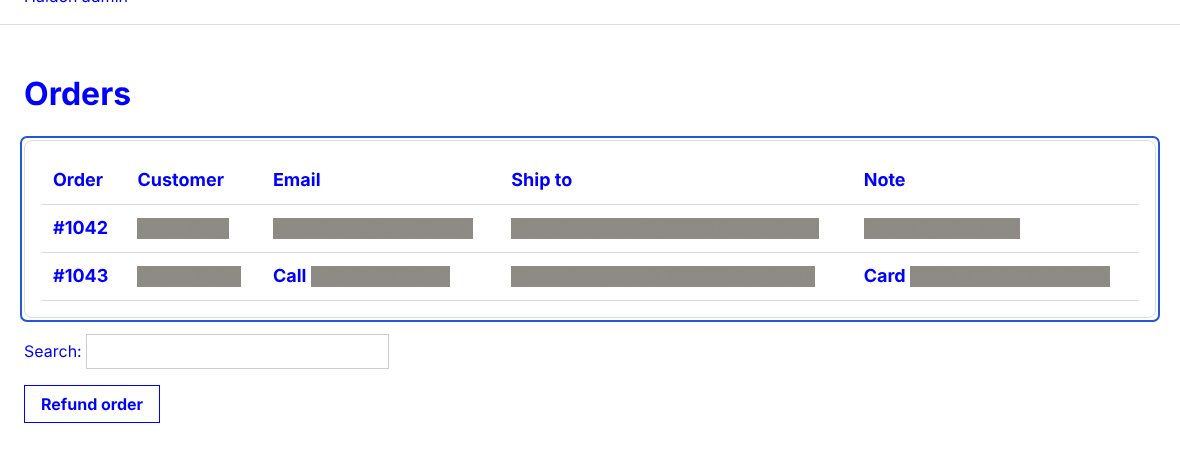
Masking covers the screenshot, every frame of a tab recording (Record), and the text that goes with a pin: the element's text, its HTML and the page title. It works the same for clients who give feedback through the review script instead of the extension (Feedback without the extension).
Three ways something gets masked
- 1.Your site's code marks it. This is the main way, and the most reliable. The people who build the site know which parts show customer data, so they mark them once and pinprompt follows the marks on every page. See [Mark private parts in your code](#mark-private-parts-in-your-code).
- 2.Automatic, with no code. Always on, on every project:
- values in form fields (inputs, text areas, selects, editable text), but not the labels of buttons;
- payment frames from Stripe, Adyen, Mollie, Braintree, PayPal, Checkout.com, Klarna, Square, Recurly, Chargebee, Paddle, Worldpay and Authorize.net: the whole frame is covered;
- email addresses, phone numbers, card numbers (checked with the Luhn test) and IBANs anywhere in the page's text;
- the same values, and tokens and keys, in the page address:
/admin/orders?customer=anna@example.comis kept as?customer=[email]. The path of the page you're on is the exception: it names the page, so numbers in it stay even when they look like a phone, card or IBAN number (/orders/0012345678), and so do product and order ids. That way every page keeps its own pins. Emails, tokens and the code in a reset or invite link are still hidden there. The addresses in the network log keep the stricter rule: a phone, card or IBAN number in a request's path is hidden too; - passwords, cookies and request headers are never captured at all. The network log keeps only the method, address, status and timing.
- 1.Project settings, for sites whose code you can't change. In Settings → General → Masking, a project owner can make pages always Strict and list extra CSS selectors to mask.
Reference images people add themselves (a screenshot of the old site) are not masked: they are stored as they look, redrawn by the browser and the server so their metadata is gone. Crop out anything private first.
A name on its own, like "Anna Berg" in a table cell, can't be recognised automatically. It needs a mark in the code, a selector in the settings, or Strict.
Mark private parts in your code
Add data-pinprompt-mask to any element. Everything inside it is masked: text becomes a grey bar, and pictures and videos inside it are covered.
<td data-pinprompt-mask>Anna Berg</td>
<section class="pp-mask">…the customer's address…</section>
The class pp-mask does the same, for templates where adding an attribute is awkward.
React and Next.js
With @pinprompt/next, wrap private parts in <Sensitive>. It adds no box of its own, so the layout doesn't change:
import { Sensitive } from "@pinprompt/next/sensitive";

<Sensitive>{order.customer.name}</Sensitive>
<Sensitive as="span">{order.customer.email}</Sensitive>
Or mark whole components in next.config.ts. Each listed component's outermost element gets the mark, in every build, production included:
export default withPinprompt(nextConfig, { mask: ["CustomerCard", "AddressBlock", "OrderNotes"] });Marks from other tools work too
If the site already hides data from a session-replay or analytics tool, pinprompt follows the same marks, with no extra work:
| Tool | Marks pinprompt follows |
|---|---|
| Hotjar | data-hj-suppress (attribute or class) |
| FullStory | fs-mask, fs-exclude, fs-mask-without-consent, fs-exclude-without-consent |
| Sentry Session Replay | sentry-mask, sentry-block (class or data- attribute) |
| LogRocket | data-private |
| Heap | data-heap-redact-text, heap-ignore |
| PostHog | ph-no-capture |
| Microsoft Clarity | data-clarity-mask="true" |
| Datadog RUM | data-dd-privacy="mask" or "hidden" |
Coding agents add the marks
The agent instructions pinprompt hands out (the Claude Code plugin, the Cursor rule and the AGENTS.md snippet in Other agents) tell agents to mark new UI that shows customer data, and never to remove a mark. Claude's fix rounds follow the same rule. A review agent files unmarked personal data as a finding.
Standard and Strict
| Mode | What is masked |
|---|---|
| Standard (default) | Everything marked in the code or the settings, plus the automatic list above. |
| Strict | All text and pictures on the page except the element the reviewer pinned. The page title and the part of the address after ? are not sent either. |
A change to these settings applies to the very next pin: the extension reads them from the server before each capture.
Make a whole project Strict in Settings → General → Masking, or only some pages with Always Strict on these pages: one path per line, with * as a wildcard.
/admin/*
/account/*
/checkout
/admin/* also covers /admin itself.
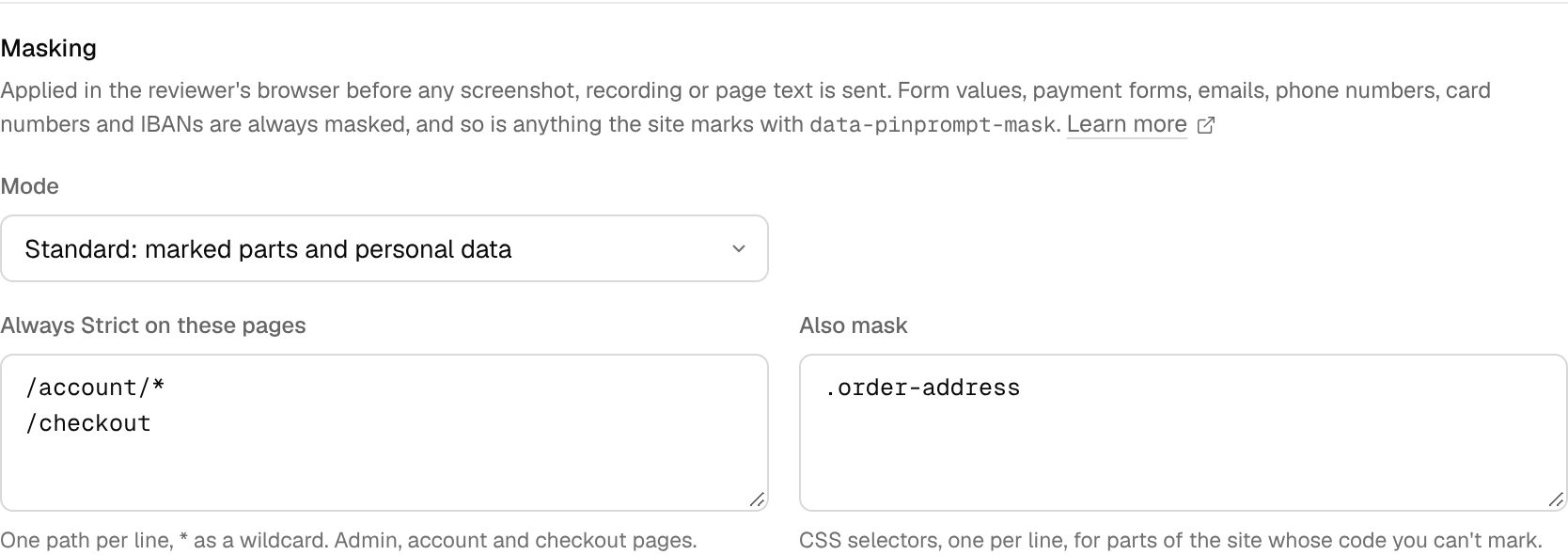
Also mask takes CSS selectors, one per line, such as .customer-name or [data-testid="order-address"]. Use it for code nobody on the team can change. A selector can't contain {, }, ;, <, @ or comments, and the list holds up to 50 entries.
What the reviewer sees
The reviewer sees the same grey bars for a moment while the screenshot is taken, and during the whole of a recording. The capture popover then shows a masked chip, such as masked 7 or masked · strict. Hovering it shows what was hidden, as counts: form fields, marked areas, payment frames, emails or numbers. The item keeps the same counts, but never what was under the bars.
On the server
The server checks again. Every capture's text (page title, element text, its HTML, transcript, console lines) has emails, phone numbers, card numbers, IBANs and tokens replaced with [email], [phone], [card], [iban] or [token] before it is stored. This catches text from an old extension or a page the browser couldn't mask. The note the reviewer typed is kept as written.
Console messages and the page title are scrubbed by pattern only. A plain name in them, like "lookup failed (Anna Berg)", stays. Keep customer data out of console messages, or use Strict, which leaves out the title.
Screenshots, recordings, transcripts and logs are deleted 90 days after an item closes, on new workspaces and on existing ones whose owner never chose a setting. An item imported from BugHerd counts from the day it was imported, not from when it was closed in BugHerd. The owner can change this, or keep evidence, in Workspace settings.
Limits
- Pictures of text (text inside an image, a canvas or a video) can't be read, so they are masked only inside a marked element or on a Strict page.
- Shadow DOM and iframes from the same site aren't looked into. An iframe inside a marked element, or on a Strict page, is covered as a whole. For a web component that shows customer data, put the mark inside the component.
- An inline style with
!importanton a marked element can override the mask's text colour. Marks on the element's parent avoid it. - In
next.config.ts,maskmarks only a component's own outermost HTML element. A component that renders another component first needs<Sensitive>ordata-pinprompt-maskin its JSX. - Masking in the extension needs version 0.2.0 or later (the store's 0.1.0 doesn't have it; use the download on /extension until the store is updated). Captures from older versions get only the server's text check.